Getting Firefox to Use Leopard’s Download Stack

Find your downloads quickly in one dedicated stack. Downloads from Safari, iChat, and Mail are automatically saved to the Downloads stack. Say goodbye to desktop clutter.

… says Apple’s “new feature” description for Mac OS X Leopard. What it doesn’t mention is that you can make (almost) any software you like use the “Download Stack”.

Fact is, the “Download Stack” just displays the contents of a folder named “Download” in your home directory (which Leopard automatically creates). So, making Firefox use it is fairly simple — here is how:

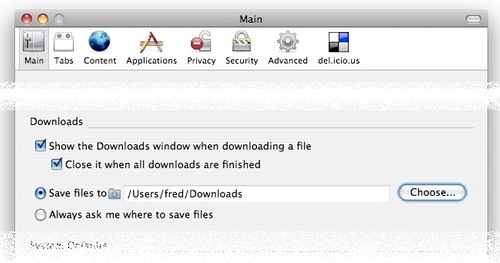
Go to the preferences window, into the “Main” tab:
Download Preferences for Firefox

Under “save files to”, go to your user folder, then choose the folder named “Downloads”.

Save the settings — and next time you download something off the net, you’ll see that it is easily (and instantly) accessible through the neat little “Download Stack” in your dock (in this case my local bus schedule. What a meaningful file name.).

OSX Leopard Firefox Download Stack
“Goodbye, desktop clutter”, indeed!


Categories: Mozilla Crosspost, Tech Talk | Tags: , , , ,

33 Responses to “Getting Firefox to Use Leopard’s Download Stack”

Pages: « 1 [2] Show All

  1. You’re very welcome — always glad to help :)

  2. I’ve tried changing all related about:config settings for download as well as for the helperApp, but Firefox still doesn’t react to changes to either its download folder or to the safari download folder, and it won’t give me a save to dialouge. The only way I can download anything is by right-clicking. This just started when i upgraded to Leopard. Is there a fix? I’m running 2.0.0.8 at the moment.

  3. I was having this same problem but finally fixed it with a post I found on the Apple Discussion Forums:

    Try this!
    Go to User/Library/Preferences and delete com.apple.internetconfig.plist (you can save it on your desktop if you want to replace it). Restart Firefox and test it.
    it worked for me.

    http://discussions.apple.com/thread.jspa?messageID=5666281&#5666281

  4. Worked for me too. Great tip! Now I can use Firefox again. Yay!

    Maybe someone should notify the Firefox dev team of this fix.

  5. [...] is a real pain. It’s cool if you’ve only got a couple of items in it, but if you use Firefox or like me have 30+ items in it that need to be filed, looked at or deleted, it’s hard to [...]

  6. I accidentally deleted the downloads stack… how do i get it back?

  7. That’s not very hard: Open the Finder, go to your home directory, then click and hold the “Downloads” folder that’s in there, drag it onto the dock, and let it drop. This creates a stack.

  8. I found the solution to this by changing the download setting in CAMINO (another mozilla browser).

    Download camino, open preferences, set “Save downloaded files to: Downloads”

    It works.

Pages: « 1 [2] Show All