stylish text with the CSS text-shadow property

This is a cross-post of an article I wrote for the hacks.mozilla.org blog. It shows off some of the fun stuff web developers can do with the text-shadow feature that will be released as part of Firefox 3.5.

The text-shadow CSS property does what the name implies: It lets you create a slightly blurred, slightly moved copy of text, which ends up looking somewhat like a real-world shadow.

The text-shadow property was first introduced in CSS2, but as it was improperly defined at the time, its support was dropped again in CSS2.1. The feature was re-introduced with CSS3 and has now made it into Firefox 3.5.

How it Works

According to the CSS3 specification, the text-shadow property can have the following values:

none | [<shadow>, ] * <shadow>,

<shadow> is defined as:

[ <color>? <length> <length> <length>? | <length> <length> <length>? <color>? ],

where the first two lengths represent the horizontal and vertical offset and the third an optional blur radius. The best way to describe it is with examples.

We can make a simple shadow like this, for example:

text-shadow: 2px 2px 3px #000;
A simple shadow

(All of the examples are a live example first, then a picture of the working feature — so you can compare your browser’s behavior with the one of Firefox 3.5 on OSX)

If you are a fan of hard edges, you can just refrain from using a blur radius altogether:

text-shadow: 2px 2px 0 #888;
I don’t like blurs

Glowing text, and multiple shadows

But due to the flexibility of the feature, the fun does not stop here. By varying the text offset, blur radius, and of course the color, you can achieve various effects, a mysterious glow for example:

text-shadow: 1px 1px 5px #fff;
Glowing text

or a simple, fuzzy blur:

text-shadow: 0px 0px 5px #000;
Blurry text

Finally, you can add ”more than one shadow”, allowing you to create pretty “hot” effects (courtesy of http://www.css3.info/preview/text-shadow/ css3.info):

text-shadow: 0 0 4px white, 0 -5px 4px #FFFF33, 2px -10px 6px #FFDD33, -2px -15px 11px #FF8800, 2px -25px 18px #FF2200
Multiple shadows are hot

The number of text-shadows you can apply at the same time in Firefox 3.5 is — in theory — unlimited, though you may want to stick with a reasonable amount.

Like all CSS properties, you can modify text-shadow on the fly using JavaScript:

Animated shadows with JavaScript

Start/stop animation

Performance, Accessibility and Cross-Browser Compatibility

The times of using pictures (or even worse, Flash) for text shadows on the web are numbered for two reasons:

First, there are significant advantages to using text instead of pictures. Not using pictures saves on bandwidth and HTTP connection overhead. Accessibility, both for people who use screen readers and search engines, is greatly improved. And page zoom will work better because the text can be scaled instead of using pixel interpolation to scale up an image.

Second this feature is largely cross-browser compatible:

  • Opera supports text-shadow since version 9.5. According to the Mozilla Developer Center, Opera 9.x supports up to 6 shadows on the same element.
  • Safari has had the feature since version 1.1 (and other WebKit-based browsers along with it).
  • Internet Explorer does not support the text-shadow property, but the feature degrades gracefully to regular text. In addition, if you want to emulate some of the text-shadow functionality in MSIE, you can use Microsoft’s proprietary ”Shadow” and ”DropShadow” filters.
  • Similarly to MSIE, when other, older browsers do not support the feature (including Firefox 3 and older), they will just show the regular text without any shadows.

A caveat worth mentioning is the ”drawing order”: While Opera 9.x adheres to the CSS2 painting order (i.e., the first specified shadow is drawn at the bottom), Firefox 3.5 adheres to the CSS3 painting order (the first specified shadow is on top). Keep this in mind when drawing multiple shadows.

Conclusions

text-shadow is a subtle but powerful CSS feature that is — now that it is supported by Firefox 3.5 — likely to be widely adopted across the web in the foreseeable future. Due to its graceful degradation in older browsers, it can safely be used by developers and will, over time, be seen by more and more users.

Finally, some words of wisdom: Like any eye candy, use it like salt in a soup — with moderation, not by the bucket. If the web developers of the world overdo it, text-shadow may die a short, yet painful death. It would be sad if we make users flinch at the sight of text shadows like typography geeks at the sight of “Papyrus”, and thus needed to bury the feature deeply in our treasure chest.

That being said: Go try it out!

Further resources

Documentation

Examples

World’s Fastest Cup Stacker

This kid is awesome:


Fastest Firefox: World’s Fastest Cup Stacker

He’s 11 years old, and the world’s fastest cup stacker. He made this “Fastest Firefox” video for the upcoming Firefox 3.5 launch. Of course Firefox can’t stack cups, but its new TraceMonkey JavaScript engine is also one of the fastest in the world!

Firefox Needs Content-Aware Image Resizing

The new feature called “content-aware image resizing” in Photoshop is amazing. There is a promotional video up on the Adobe site that’s really fun to watch. For example, they make a Volkswagen bus more “economical” (mind you, while keeping the wheels round):
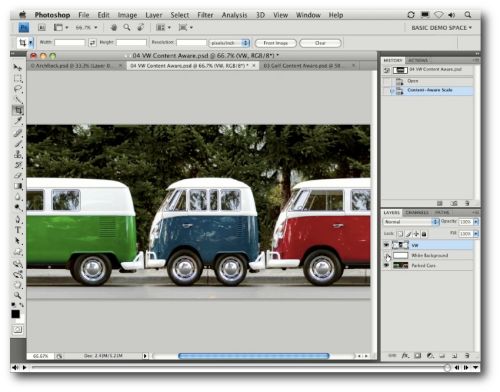
The technology behind it is based on research from an Isreali research group. That group put a video up on youtube in 2007 already:

It’s a little more technical, but no less impressive, so all of you geeks who wonder how it actually works should watch this as well.

I can tell you one thing: I want this in Firefox’s page resizing code. Sadly, I assume it is strictly patented and Adobe will probably have made sure to have some sort of exclusive deal on it.

Update: A commenter points out, there is an open source plugin for the GIMP that does content-aware resizing–already since 2007. Thank you, Gandalf!
Downloading a Complete Picasa Web Album (Without Installing Picasa)

Google’s Picasa Web Album supports downloading an entire album, however, it requires the Picasa software to do so. Bummer if you are on a Mac, or don’t want to (or can’t) install Picasa on your computer.

There’s another tutorial online that suggests using a Greasemonkey script to surface the download links, then use the DownThemAll Firefox extension to grab the links.

Sadly, the Greasemonkey script in question stopped working after a recent code change on the picasa website. I was able to easily fix it, but due to the lack of an open license, I am unable to share the script with you :(

However, I found an alternative solution: The album’s RSS feed! Along with the aforementioned DownThemAll extension, you can easily download a complete album off Picasa Web. Here is how:

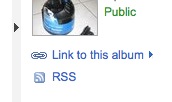
Go to the desired Album, and click the “RSS” link on the right hand side:

Firefox will show you the RSS feed in a more or less appealing way. Note that each of the pictures shown has an “attached” JPEG file underneath:

The only thing we need to do is download all of these with DownThemAll. For that, right-click, and choose “DownThemAll”. In the “links” tab, it’ll automatically grab all pictures for you:

Just hit “start” and let it load!

Hope this helps!

Not a Firefox

I promise, my blog is not going to turn into a “desktop wallpaper collection”, but this one is too cool not to show it to you:


“Ceci n’est pas le fond d’écran officiel de Firefox / This Is Not The Official Firefox Background Picture”

By the way, the photographer Denis-Carl Robidoux publishes a picture per day, all of which in different sizes to fit your screen, and for free, too.

Red Panda Wallpaper

Just found a nice red panda pic that works as a desktop wallpaper:

The picture was made by meantux on flickr, and is licensed under a CC by-nc license.

Categories: photo, websights | Tags: , , ,

Bank of America Supports Firefox (Finally)

From the “announcements” section of Bank of America’s online banking:

Firefox is now supported by Online Banking.(New)

Experienced Firefox users and customers interested in using Firefox can conduct Online Banking activities knowing that the browser is fully supported. For information about settings that will help you get the best possible Online Banking experience with Firefox, visit our Browser Help and Tips.

Glad to hear!

Categories: Mozilla Crosspost, websights | Tags: ,

Off to the Mozilla Summit 2008

Yay, I am out and about for the Mozilla Summit 2008 in the beautiful Whistler, British Columbia, Canada.

It’s going to be an exciting week with a lot of people I know and haven’t seen in a long time, and there will be many new people to meet as well. I am looking forward to it!

Whistler itself is a breathtaking place, they say, so I am particularly thrilled that such a great place was picked for the event. I know at least one of my friends is jealous because he’d love to go mountain-biking there!

If you want to see what’s going on at the Mozilla Summit, hop on over to summit.mozilla.org, a new mash-up site showing tons of media related to the summit. Soon it’ll look much fuller than this:

I’ll write again when I’m there :)