Downloading a Complete Picasa Web Album (Without Installing Picasa)
Google’s Picasa Web Album supports downloading an entire album, however, it requires the Picasa software to do so. Bummer if you are on a Mac, or don’t want to (or can’t) install Picasa on your computer.
There’s another tutorial online that suggests using a Greasemonkey script to surface the download links, then use the DownThemAll Firefox extension to grab the links.
Sadly, the Greasemonkey script in question stopped working after a recent code change on the picasa website. I was able to easily fix it, but due to the lack of an open license, I am unable to share the script with you
However, I found an alternative solution: The album’s RSS feed! Along with the aforementioned DownThemAll extension, you can easily download a complete album off Picasa Web. Here is how:
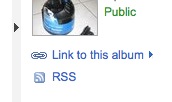
Go to the desired Album, and click the “RSS” link on the right hand side:

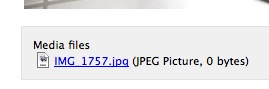
Firefox will show you the RSS feed in a more or less appealing way. Note that each of the pictures shown has an “attached” JPEG file underneath:

The only thing we need to do is download all of these with DownThemAll. For that, right-click, and choose “DownThemAll”. In the “links” tab, it’ll automatically grab all pictures for you:
Just hit “start” and let it load!
Hope this helps!


Thank you for posting this! I’m now completely willing to bear your children because of the amount of time you’ve saved me
Haha, you are very welcome.
If you are on a Mac, iPhoto can also download the pictures from the RSS url.
Thanks for pointing that out.
hi there,
i’m on XP with firefox, and am having problems with this solution. i go through these steps, but then, when DTA tries to grab the links, it renames them all to “albumname.htm”. It seems like, when it goes to grab the link, it’s getting a webpage instead of a image. any help greatly appreciated!
thanks,
allie
@allie: Do you see the “media file” (= JPG) under each picture in the RSS feed? What happens if you click on it? Does that show/download a full-size picture? If not, what do you see? The owner of the album may have disabled downloading of the full-size pictures.
If downloading them individually *does* work, you may not have checked the right settings in the DTA window. There are several options at the bottom. Make sure to check the one(s) (probably: “images”) that results in the image files to be downloaded only. Compare your window to mine, shown in the blog post (click on it to make it bigger).
Good luck!
Hi! Thanks for the reply. When I click on it, a new page comes up which contains the full-size pic. It’s not *just* the full-size pic that shows up. Are you still able to use this method, or has picasa changed their interface once again?
I’ve taken a close look at your pic. When I select “Images” in DTA, none of the downloads get highlighted. Indeed – you get every other line selected. But for me, I don’t see that lht.ggpht.com line at all. I just get all the picasaweb.google.com/lh/photo lines. My friend, I’m sure, didn’t disable full photo downloading (after all, when i click through, i can see them). The description in DTA *does* have the .JPG field filled out for each line.
I’ll be interested to hear if this is still working for you. Thanks a ton!
allie
I can confirm that it’s still working on my end of things with this method.
Thanks for confirming this, Crystal. Same here: Works as expected.
very strange. this still doesn’t work for me. I’m on Windows, using firefox 2.0.0.17 with DTA 1.03. The links on the RSS page, for me anyway, don’t point to an image file directly. Rather, when clicked, lead to another html page which has the full-size image embedded in it. So, when DTA tries to get the links, it ends up getting html pages rather than jpg files. (of course, none of the download items get selected when i specify “images” in DTA).
Not sure why we’re seeing different behavior. And it’s a bummer, cause it’s such a nice, simple solution. Oh well. thanks!
allie
Gr8!
Thanks a lot
Hi Again,
Well, I’ve upgraded to FF3, and it now works for me! Not sure if that’s what did it or not, but regardless, it’s working like a charm. Thanks.
Allie
Awesome thanks!
OH: what a simple and good solution. No installation required, just use your favorite downloadmanager (in my case flashget and flashgot) after clicking the RSS button!
thanks
It is not working for me. I open firefox and type the url where I want to download pictures from. I click the album I want. I click RSS and it opens a very long file with a lot of programming codes all over. It also has a lot of urls. I also get this message at the very top of the page: “This XML file does not appear to have any style information associated with it. The document tree is shown below.”
Now I go to the tools and click DownThemAll and a small window pops up and tells me that “no links or pictures found”.
I would appreciate any help on this one. As you have noticed, I need a very simple step by step instruction. Thanks.
Ram: What version of Firefox are you using? Both Firefox 2 and 3 should display an RSS file with some sort of “pretty” style. If you are using any version older than that, I strongly encourage you to upgrade.
Thanks Fred. I updated Firefox to version 3 and now I see the list of “pretty pictures”. When I click media files ( jpg image that says 0 bytes), it shows the original size of the picture and I can right click and save it. But the idea is that I want to be able to save the whole album at one time.
Oce I see the list of pictures, I go to tooks and click DownThemAll. I also made sure only images option is checked and I also specified where to save. All it does is saves the album cover pictures and it is so small (8kb). Some reason I am still not able to save the whole album and the original upload size. Thanks for your help.
Do make sure that you are in the “links” option of DownThemAll, and also make sure that the ones being downloaded are the files hosted on lhX.ggpht.com (with X being a number).
Fred,
It worked. I was not downloading from the links. Thanks again. Your program is great.
Glad it works for you now! Have fun!
Thank You Very Much. This article has helped me a lot today…
Thanks a lot..
i have been lookin for this for long..
works awesome..
dude u simply rock ………..
u made ma day ……
nice! great for mac users who don’t want to install picasa!
Hey,
this works fine, but with private albums its a problem as there is no RSS feed
any workarounds for that?
Brilliant Idea! Thank YOU!
excellent tip….. works well with all sort of Album options, mine of others..
Thank you very much for this nice tip. What I appreciate the most, is the simplicity of the explanation. I’m not very good in english and sometimes i dont really understand tutorials but yours is easy and simple.
You just saved me a lot of time!
Yesterday, I downloaded 1100 pictures 1 by 1…..
thank you!
Thanks alot man, this works like a charm and saved me ALOT of time!
You are welcome, guys!
Thanks a lot man. It worked!
well – after coming back to try to use this, i found an issue. If pics are loaded in the album that are greater than 1600×1200, this trick only gets you a downsized 1600×1200 version. Worse than that, the EXIF data is stripped from those downsized versions. So, while this works in a pinch, it still has some some serious drawbacks as far as I can tell. I’ve tried some of the other tools out there, but none of them seem to work. Apart from Picasa itself of course, but i can’t stand that piece of software, so I ain’t touchin’ it.
Well…that RSS idea is awesome:)…Thanks so much!
Awesome idea, thanks a lot. Saved me a lot of time and clicking.
I wrote a Ruby script for downloading all the photos in Picasa Web albums, grouped by album. This gets the original photos, not 1600×1200 thumbnails.
You can read about how to use it here: http://blog.costan.us/2010/01/automated-backup-for-picasa-web-albums.html
Victor: This is great, thanks for sharing it!