Multiple Time Zones in Google Calendar

Google Calendar has a new feature that many international Mozillians may like: It can now display more than one time zone at a time. In my case, lining up the Central European and Pacific time zones next to each other comes in quite handy:
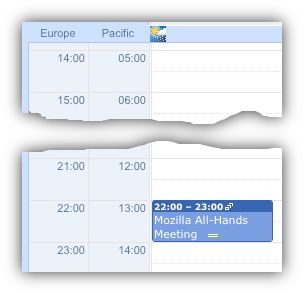
Google Calendar: Time Zones

Of course, when entering a new event, it does not seem to allow selecting the time zone this refers to quite yet, let’s hope that’ll be fixed in a future iteration.


5 Responses to “Multiple Time Zones in Google Calendar”

  1. It’s about time someone finally got a clue.

    I am totally sick of calendering applications that seem to think the only 2 timezones of interest are your default timezone and the default timezone of the person who set up the meeting.

    The only timezone I really care about is the time of the meeting in the timezone where I am going to be at the time of the meeting which might be neither of the 2 mentioned above.

  2. […] Fredericaina 本站文章除注明转载外,均为本站原创编译 […]

  3. I’ve had this enabled for awhile now – I don’t think I could effectively use a calendar without it. Just wish the timezone support was a bit more integrated – especially when adding/editing events.

    Another cool thing it has it detecting when your computer’s timezone changes – it will then ask if you wish to change the main timezone of the calendar (while keeping events at the correct time).

  4. Nice idea, I created a shared calendar with an Amsterday time-zone but it does not seem to want to show up. I have changed and save the calendar settings several times but to no avail.

  5. Geezenslaw, I have the same issue — I created a whole new calendar for events that will be happening in Pacific time, and had saved it in that time zone multiple times. All of the events still showed up as eastern time while viewing from my computer here in the eastern time zone. Can’t figure this out…

Leave a Reply