PHP: Multi-byte-safe number_format function
I recently ran into a problem with PHP’s built-in number_format function. The function is actually quite handy: It allows you to format a number in a manner that is appropriate for the language your website is currently in.
Example: To write the number 4505 and 31 hundredths in English, you’d write “4,505.31″. In German or Spanish however, the comma is the decimal separator, in turn using the point as the “digit group separator”: “4.505,31″. Swiss German, however, uses an apostrophe-like character as a digit group separator: “4’505,31″. And so on, and so forth.
All of these are supposedly addressed by using the number_format() function, feeding it the number to be displayed and the regionally appropriate separator characters.
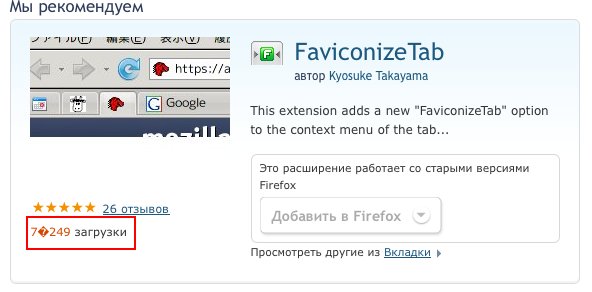
Sadly though, when you do this for Russian and other eastern European languages, your result looks like this:

The reason is that number_format can’t handle UTF-8 multi-byte characters (which are commonly used to encode non-ASCII characters, like ü, ß, or the whole Cyrillic alphabet. In fact, this whole blog is served to you in UTF-8-encoded characters.) If you think that’s ironic that a function meant to simplify localization cannot handle the characters needed for exactly that purpose, so do I.
Either way, in order not to make our international customers too sad, I wrote a little workaround for this problem, and it’s actually quite simple: First it formats the number with placeholders (both “single-byte” characters, so number_format can handle them), and then it uses str_replace() to replace these characters by the ones appropriate for your current locale.
Here you go, the whole code for your entertainment and use, if you want to. Just, if you use it, I’d appreciate you leaving a comment here. Have fun!
/**
* multibyte-safe number_format function.
* Uses regular php number_format with "safe" placeholders, then replaces
* them by their actual (possibly multi-byte) counterparts.
*/
function mb_number_format($number, $num_decimal_places = 0) {
$localeconv = localeconv();
$placeholders = array('@', '~');
$actual = array($localeconv['decimal_point'], $localeconv['thousands_sep']);
// format number with placeholders
$formatted = number_format($number, $num_decimal_places,
$placeholders[0], $placeholders[1]);
// replace by localized characters
$formatted = str_replace($placeholders, $actual, $formatted);
return $formatted;
}

I ran across a similar issue before as well. It should be noted the function was never designated as multi-byte safe, so it shouldn’t be assumed to be.
It’s been documented before too:
http://us2.php.net/manual/en/function.number-format.php#69192
Good grief PHP is a mess. You even have to feed it the separators yourself?
Actually, your function does not work properly. This is because str_replace processes your array one item at a time. That is to say, first it will search the entire string for all occurrences of the first item, and replace them, then it will search this string for all occurrences of the second item, and replace those.
So, if localeconv() gives you back array(‘,’, ‘.’), which is what it should do for the Dutch locale, for instance – then the result of 1234.56 becomes 1.234.56, whereas it should be 1.234,56 . This is because at first the dots are changed to commas, and then all commas to dots.
In javascript at least, you can call .replace with a regexp (matching both items) and a function parameter, so you could do something like:
“1,234.56″.replace(/[,.]/g, function(match) { return (match == “.”) ? “,” : “.”; } );
which does what you want. I’m not sure if preg_replace or friends have similar functionality in php, I’m not very familiar with it.
Robert:
Yet again, due to the nature of the functions very purpose, it should be multi-byte save. I guess that might be source of the wrong assumption that it is. Or as Frederic put it: it s kind of ironic that it isn’t.
@Robert, this is correct. The manual does not claim this function being multi-byte safe. However, it’s one of the functions where you would surely hope it was
@Gijs: oh, thanks for pointing this out. I guess I could get around this by using more exceptional placeholders (like @ and ~), I’m going to do this now but that’s not quite as universal as I’d like it to be. When I looked at the preg_replace manual page though I didn’t find information so far on how it does the string replacements, so I may have to test that.
@Robert: another thing: that comment you linked to was actually the hint that pointed me into the right direction for figuring out where these question marks came from.
When I googled for a workaround though, I couldn’t find one (except possibly whole frameworks that also handle this correctly) so I just wrote a little function myself.
Actually, number_format is also broken in another aspect – it assumes that you always want to group three digits together. Now for some locales that isn’t what you want to do, see http://blogs.msdn.com/oldnewthing/archive/2006/04/17/577483.aspx
Now you can have fun fixing Japanese locale on AMO.
Wladimir, thank you for your comment. nothingEverEasy++ While I don’t think the Japanese people will chop our heads off for three-digit-grouping their numbers, this aspect indeed adds to the annoyance of number_format.