When I just closed Firefox (on OSX), I got this window:
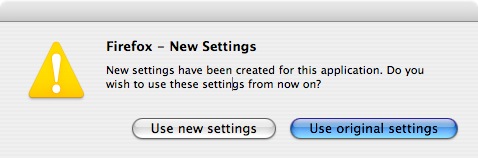
Quite frankly, I am confused. Now I don't know if this is a Firefox window or one that the OS gave me, but since I upgraded to OSX 10.4.9 earlier today, it is possibly something OSX asked me. Yet, I have a few thoughts on this, if you ask me, unfortunately bad piece of UI.
- May I see your ID please? Who are you, after all? Not only did the window itself not have a title in the title bar, also the menu bar was completely empty. I had no idea whatsoever, what process/entity/program asked me this question. I actually still don't know. Let alone...
- ... why? As a basic rule of thumb, I expect dialog windows to tell me, at least, why they they showed up in the first place. "New settings have been created" is fairly vague. What kind of settings? Who created them? And why do I have to make a decision? But worst of all...
- ... what will happen? Now that I don't know what the decision is even about, I am even worse off since I don't know the implications of either of the decisions. If I click "new settings", will you overwrite my Firefox profile? Will I lose data? What will change, compared to how it was before? Or, if I click "old settings", (still assuming the window has a reason to show up in the first place:) will that make my Firefox instance unusable/incompatible with some sort of magic and important component?
I clicked "Use new settings", and, judging by the fact that I can still blog, that doesn't seem to have been the "wrong" decision. But you never know...
Thoughts?
Update: The fabulous little box is apparently an effect after several subsequent crashes of an application on OSX. There's an Apple help document about it, thanks for pointing that out in the comments, Michael.